
The LinkedIn Panopticon
The Full Story of BrowserGate and the Death of Privacy

SPECIAL ANNIVERSARY BULLETIN: 04.03.2026
(One year ago, we began the mission of deconstructing the digital cyberspace. Today, as I expose the “LinkedIn Special Operation,” I am opening the gates.
To celebrate my 1-Year Anniversary, I am offering 50% OFF Annual Subscriptions
USE CODE→ digitalmark.substack.com/483153a4)
(The following investigation contains sensitive technical findings regarding Linkedin and the intelligence operations they deployed against you. Read with caution).
For years, the collective grievance against LinkedIn was aesthetic. We complained about the “Broetry” which translates to those one-sentence-per-line manifestos about “hustle” and “synergy.” We groaned at the fake-deep anecdotes where a trip to a coffee shop became a masterclass in B2B sales. We tolerated the platform because we had to in the sense of the necessary evil for career progression. A “digital office,” if you may.
For a very long time I had a gut feeling that there’s something more to LinkedIn, a much darker side of things that no one had the courage to speak, because it’s taboo and can affect the prospect of a future job.
(Most likely you know me by now that I’m very serious person and even when I tell a joke, my family tells me that it was not funny. So, yes I’m very serious when I’m writing this article).
In April 2026 (yesterday to be precise), the narrative shifted from cringe to criminal.
With the release of the BrowserGate report by Fairlinked e.V. and the subsequent viral exposure of the “Spectroscopy” scandal on X (formerly Twitter), the mask has been ripped off. LinkedIn is no longer just a professional networking site. According to the evidence, it has transformed into one of the most sophisticated corporate espionage and psychological profiling engines ever built. (That last sentence should send shivers down your spine).
By silently scanning user browsers for over 6,000 different extensions, LinkedIn hasn’t just crossed a line, it has demolished the concept of digital privacy. This is the story of how LinkedIn went into “the shit,” and why the professional world will never trust Microsoft again. LinkedIn isn’t just a website anymore where you browse some jobs or talk to your co-workers, it’s in fact an active piece of persistent forensic software that audits your computer the second you log in.
Part I: The Discovery of “Spectroscopy”
The BrowserGate report didn’t start with a whistleblower, it started with a performance lag. Developers and privacy researchers noticed that upon loading the LinkedIn homepage, Chromium-based browsers (Chrome, Edge, Brave) would experience a massive, near-instantaneous spike in resource usage.
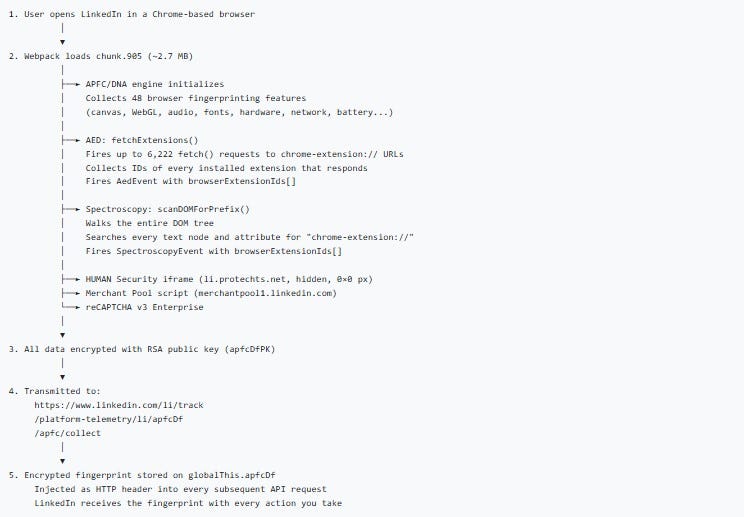
When researchers at Fairlinked e.V. de-obfuscated the site’s JavaScript, they found a hidden module titled “Spectroscopy.”
Moving on to those 6,167 Probes….
Unlike standard security checks that look for a handful of known malicious bots, Spectroscopy was designed to ping a massive database of 6,167 unique browser extensions. Every time a user logged in, LinkedIn was essentially “feeling around” inside the user’s personal browser environment.
This wasn’t a random check. The list was curated and it included:
Sales & Lead Gen Tools: Apollo, Lusha, ZoomInfo, RocketReach.
Job Search Aids: Simplify, Teal, Huntr, and over 500 other auto-appliers.
Security Tools: VPN toggles, password managers, and ad-blockers.
Identity Markers: Dyslexia aids, screen readers (health data), and religious prayer timers (faith data).
LinkedIn wasn’t just checking if you were a bot. It was checking who you are and how you work through the following methods:
Obfuscation: The code was hidden inside layers of compressed, non-human-readable JavaScript. Genuine security tools are usually disclosed in a site’s “Security” or “Privacy” documentation.
Idle Scanning: LinkedIn used the <
requestIdleCallback> function with module Module 75023. This is a technical trick that waits until your computer isn’t doing anything else to run the scan. Why? So you don’t notice the CPU spike. It is a “stealth” tactic used by malware, not professional social networks.Parallel Batching: They didn’t check one extension at a time. They fired off thousands of requests in milliseconds. This is a “brute-force” approach to data collection.
Part II: The Corporate Espionage Angle
Why would a social network care if you have a sales tool like Apollo installed? The answer lies in the value of Commercial Intelligence.
LinkedIn sells its own premium services: Sales Navigator and Recruiter Lite. These tools cost thousands of dollars per year. By scanning your browser, LinkedIn can see exactly which of its competitors you are using.
Mapping the “Software Stack”
If LinkedIn sees that 400 employees at a major tech firm have the Lusha extension installed, they don’t just have a data point, they have a lead. They know exactly which rival software is being used within that company. This allows LinkedIn’s sales teams to target those specific companies with surgical precision, offering “switch-and-save” deals or undermining the competitor’s functionality on the LinkedIn platform itself.
This is corporate espionage masquerading as “platform integrity.” By looking through the keyhole of your browser, Microsoft/LinkedIn gained a god-like view of the global SaaS (Software as a Service) market share in real-time.
By combining their Spectroscopy scanning with their Identity Verification (via partners like Persona and CLEAR), they have essentially built a 360-degree digital and physical profile of you.
Here is their deep level mapping of what they are actually collecting:
1. The ID Verification Trap (The “Persona” Scandal)
I and many others noticed that Linkedin started demanding IDs around 2024 and I often wondered why they implemented that. We fast forward to today and we find out that in 2026 appeared multiple reports that show that their partner, Persona, doesn’t just “check” your ID. Persona is doing far more than “checking”.
NFC Data Extraction: If you scanned your e-passport using your phone, they extracted the biometric chip data.
The 17 “Subprocessors”: Investigation revealed that your ID data isn’t just with LinkedIn, it was shared with a network of “subprocessors” that includes data brokers and credit agencies.
Cross-Referencing: They reportedly cross-reference your ID against government databases, utility bills, and postal records to ensure you are a “high-value” real person.
2. The Chrome “Autofill” Connection
This is where it gets technical and “fishy.” When LinkedIn runs its Spectroscopy scan, it’s looking at your browser’s internal state.
Identity Linking: If you have Chrome’s Autofill active, and you have extensions that manage your identity (like password managers or “Sign in with Google” helpers), LinkedIn’s scan can see those IDs.
The Smoking Gun: Because they have your Real ID (from the 2024 verification) and your Device Fingerprint (from the 6,000-extension scan), they can link your “anonymous” browsing habits across the web back to your legal name.
3. Why the “Verified” Badge is a “Target”
LinkedIn markets the “Verified” badge as a way to “build trust.” In reality, it acts as a High-Value Target marker.
If you are verified, LinkedIn knows your data is 100% accurate.
This makes your profile 10x more valuable to the third-party security and intelligence firms they are reportedly routing data to.
You aren’t “verifying” yourself for your peers; you’re authenticating your data for their buyers.
Part II. I. Cyber Intelligence Special Operations.
Now, we go into a tiny part of what’s called Cyber Intelligence Special Operations space.
LinkedIn officially frames this as “Platform Integrity,” the technical and structural reality of the operation suggests something far more aggressive.

1. The Tactical Parallels to Intelligence Ops
To be classed as a “Special Operation,” an activity usually requires stealth, specific targeting, and cross-domain impact and LinkedIn’s BrowserGate checks every box:
Covert Reconnaissance: Using <
window.requestIdleCallback> to hide CPU spikes is a classic “low-and-slow” infiltration tactic. By waiting for your computer to be idle, the script ensures the user never notices the surveillance, just like a silent “sleeper” agent.Signal Intelligence (SIGINT): By scanning for 6,167 extensions, they aren’t just looking for “bots.” They are performing pattern analysis. If you have a specific dev tool + a specific VPN + a specific encrypted messenger extension (Signal or other classified app), they have “mapped” your digital lifestyle.
Social Engineering via Algorithm: Once the data is gathered, it feeds the Career Guillotine. This is “Information Warfare” because of it’s use of gathered intelligence to manipulate a target’s real-world environment (in this case, their ability to get a job) without them ever knowing why.
2. The “Intelligence Unit” Connection
The strongest link to “Special Operations” is the destination of the data.
The 2026 investigation highlighted that LinkedIn shares this forensic data with HUMAN Security (formerly White Ops).
When a private company uses code developed by or shared with veterans of state-level intelligence agencies to scan a billion civilians, the line between “Terms of Service enforcement” and “Cyber Intelligence” effectively vanishes.
Case in point:
If you are applying independently on a company’s own website, you might think you’re safe from LinkedIn’s “Career Guillotine.” You aren’t. Here is how that “zero-pixel” (tracking pixel) and the broader surveillance net still catch you:
1. The “Insight Tag” Dragnet
Most mid-to-large companies have the LinkedIn Insight Tag (a tracking pixel) installed on their “Careers” page and their “Thank You for Applying” page.
The Match: When you land on that company page, the pixel fires. If you are logged into LinkedIn in another tab (or have a persistent cookie), LinkedIn immediately links your “anonymous” visit to your Real ID.
The Extension Check: Because the Insight Tag can execute JavaScript, it can trigger the same Spectroscopy scan on the company’s site that it does on LinkedIn.com. It sees your auto-fillers, your “Easy Apply” bots, and your resume optimizers while you are on the company’s site.
2. The “Automated Candidate” Label
Once the pixel identifies that you are using “unapproved” automation tools, you are tagged in LinkedIn’s backend.
The Recruiter Alert: When that company’s HR person opens their LinkedIn Recruiter dashboard to see who applied, LinkedIn can display a “High Risk” or “Automation Detected” warning next to your profile, even if you applied through the company site.
The Algorithm Bias: If the system labels you as a “Bot User,” your profile may be automatically moved to the bottom of the pile or hidden behind a “Spam” filter that the recruiter has to manually click to see. Most never do.
3. The “Cross-Site” Behavioral Profile
LinkedIn doesn’t just track that you applied, it tracks how you applied.
Typing Speed & Movement: The tracking script monitors your “dwell time” and how fast you fill out the form. If you use an auto-filler, the data enters the fields in milliseconds. A human takes seconds.
The Verdict: LinkedIn logs this “Inconsistent Behavioral Pattern.” Even if you are a real human, using a tool that makes you look like a bot gets you the “Shadow Decline.” They may lower your reach or feed you ghost jobs, effectively making the platform useless for you without you knowing why.
4. The Microphone/App Loophole
As most of you know this by now, the mobile app is a persistent snooper.
Environmental Context: If you have the app on your phone and you’re sitting at your desk applying for jobs on your laptop, the app can use Ultrasonic Cross-Device Tracking. It picks up high-frequency “beeps” (silent to humans) emitted by the tracking pixels on your laptop screen to confirm that this specific phone and that specific laptop belong to the same person.

The “Conviction” Label: If you are talking to a friend about a career change or a specific company, and the app’s “engagement signals” (microphone) pick up those keywords, your “Intent Score” is updated. If your intent doesn’t match the “Corporate Value” labels LinkedIn has assigned you, the “Alarms” go off.
Part III: The Privacy Violation (The X Factor)
The investigation revealed that the results of these browser scans, highly personal lists of a user’s software and digital habits, were being routed through third-party cybersecurity firms, including entities with deep ties to intelligence sectors.
This turned a “privacy bug” into a international and national security concern. If a high-level government official or a defense contractor logs into LinkedIn, the Spectroscopy scan captures their security extensions. It knows if they use encrypted messaging plugins or specific VPNs. In the wrong hands, this is a “vulnerability map” for every professional in the world.
The Death of “Private” Job Hunting
For the average user, the betrayal is more personal. Most people use LinkedIn to find a way out of their current job. We install extensions to help us track applications or automate the soul-crushing “Apply” buttons.
The BrowserGate evidence suggests that LinkedIn logs these job-search extensions. If you are browsing LinkedIn at your current office, LinkedIn knows you are looking to leave. While they claim they don’t share this with employers, the data exists. In an era of “At-Will” employment and AI-driven performance reviews, the mere existence of this data is a loaded gun pointed at the employee.
Part IV: Legal Armageddon (GDPR and the DMA)
For many years, people all across the world were abused and told they have no rights, which inherently is a big lie. This is the part where I tell you to - GO GET THEM!
LinkedIn’s biggest mistake wasn’t just being creepy, it was being creepy in the European Union.
Article 9: Sensitive Data
Under the General Data Protection Regulation (GDPR), the collection of “Special Categories of Personal Data” is strictly forbidden without explicit, informed consent. By scanning for extensions related to disability (screen readers- highly illegal) and religion (prayer alerts), LinkedIn effectively collected health and religious data on millions of EU citizens.
There is no “oops” in GDPR. If the scan happened, the violation happened.
The Digital Markets Act (DMA)
Furthermore, as a designated “Gatekeeper” under the EU’s Digital Markets Act, LinkedIn is legally required to allow third-party interoperability. Instead, they built a “Search and Destroy” system to identify users who use third-party tools (like lead generators) and, shadow-ban or limit the reach of those users.
Legal Recourse (How to Fight Back)
LinkedIn isn’t just violating “etiquette”; they are allegedly violating several major international laws. Depending on where you live, you have different levers to pull.
1. The GDPR “Right to Object” (EU/UK Users)
Under Article 9 of the GDPR, the collection of “Special Categories” of data (religion, health, etc.) requires explicit consent. Since LinkedIn’s scan can identify religious prayer timers or disability aids (screen readers), they are in deep water.
Action: File a formal Subject Access Request (SAR). Specifically ask: “Does LinkedIn maintain a record of my installed browser extensions or unique extension IDs?”
Report to the DPC: If you are in the EU, file a complaint with the Irish Data Protection Commission (LinkedIn’s EU headquarters). They are already under pressure to investigate “BrowserGate.”
2. The Digital Markets Act (DMA)
LinkedIn is a designated “Gatekeeper” in the EU. The DMA prohibits gatekeepers from discriminating against third-party services. By scanning for and potentially “shadow-banning” users of rival tools (like Salesforce or Apollo), LinkedIn is likely violating the DMA.
Action: If you are a business owner whose tools are being blocked/scanned, you can report a non-compliance case directly to the European Commission.
3. Class Action Lawsuits (USA)
In the US, privacy litigation often falls under the Video Privacy Protection Act (VPPA) or state-specific laws like the CCPA (California).
Status: A federal judge (as of March 2026) has already advanced a class-action lawsuit against LinkedIn regarding the unauthorized sharing of user data via tracking pixels. The “BrowserGate” evidence is expected to be added to these filings as a “Deceptive Trade Practice.”
Action: Keep an eye on firms like Lieff Cabraser or Hausfeld, which often lead these tech-privacy class actions. You can usually join these as a claimant once they are certified.
4. The “Fairlinked” Campaign
The organization that broke the BrowserGate story, Fairlinked e.V., is currently crowdfunding a massive legal challenge in Germany. Supporting or joining their mailing list is the fastest way to get involved in the collective legal pushback.
Part V. Cybersecurity Measures
Now, we go deep into effective measures and countermeasures from beginner all the way to advanced. You should know that moving from a certain level towards advanced level you will need specialized knowledge and expertise (or someone who can train/ guide you in the art of cyber protection).
Beginner Level
Check your extensions: If you use sensitive tools, assume LinkedIn has a record of them.
Switch Browsers: Use Firefox or a “Hardened” browser for all LinkedIn activity.
Audit your “Privacy” settings: Though as BrowserGate shows, the most important “settings” are the ones LinkedIn didn’t tell you about.
1. The “Nuclear Option”: Switch Browsers
Move to Firefox or Safari: The current scanning code is reportedly optimized for Chrome’s extension ID system. Firefox handles extension privacy differently, making it much harder for a website to “ping” an extension’s internal files.
Use Mullvad Browser: This browser is designed specifically to prevent “fingerprinting.” It blocks the type of staggered sequential scans LinkedIn uses to identify your software stack.
1.1 Why Brave is the “Escape Hatch”
Brave has become the primary refuge for people trying to dodge this for three reasons:
Farbling: Brave has a unique feature called “Farbling” that adds “noise” to your browser fingerprint. When LinkedIn’s script tries to ask, “Does this user have extension <[ID: meajfmicibjppdgbjfkpdikfjcflabpk]?”> Brave can effectively lie or provide a randomized response that breaks the scan.
Shields Up: Brave’s native “Shields” are reportedly being updated in real-time to block the specific module 75023 (the hidden JavaScript bundle discovered by Fairlinked e.V. that contains the surveillance architecture).
Chromium without the “Snitching”: Since Brave is built on Chromium, your extensions still work, but the browser doesn’t expose your extension list to websites as easily as vanilla Google Chrome does.
2. Create a “Clean Room” Profile
If you must use Chrome, create a dedicated LinkedIn profile (Click your profile icon in Chrome → Add).
Zero Extensions: Do not install any extensions in this profile. No ad-blockers, no lead-gen tools, no job-search trackers. This gives the “Spectroscopy” scan nothing to find.

3. Technical Blocks
Disable JavaScript (Hard Mode): You can disable JavaScript for <.linkedin.com> in your browser settings. The site will look like it’s from 1998 and many features will break, but the “Spectroscopy” scan cannot run without JavaScript.
uBlock Origin + EasyPrivacy: Standard ad-blockers aren’t enough. In uBlock Origin, go to the dashboard and ensure “EasyPrivacy” and “uBlock filters – Privacy” are checked. This can block the telemetry pings sent back to LinkedIn’s servers. (I told you a couple of days ago about uBlock and that note was a precursor to this article - notification in advance).
Canvas Fingerprint Blocking: Use a browser that blocks “Canvas Fingerprinting” (like Brave or Librewolf). This stops LinkedIn from identifying your unique hardware/GPU signature.
Use Process Monitor (ProcMon) alongside it. If you see LinkedIn.com triggering file system queries that have nothing to do with rendering a webpage, you’ve caught them in the act of local machine snooping.
Tripwire: Advanced users have begun installing Host-based Intrusion Detection Systems (HIDS). If a LinkedIn tab tries to query a file path in your User Data folder that isn't required for a webpage, Tripwire screams. You’ve turned the forensic tool against the forensics team.
4. Kill Background “Sniffing”
Mobile Users: Deny LinkedIn permission to “Motion & Fitness” (used for ambient profiling) and set Location to “Never” or “Only While Using.”
Disable Notifications: On mobile, this prevents LinkedIn from maintaining a persistent background process that can execute telemetry checks while the app is “closed.”
5. Revoke Third-Party Access (Specialized know-how)
Go to your LinkedIn Settings → Data Privacy → Other Applications. Revoke everything.
Delete the Identity Data: If you did the ID verification, you can technically request that the third-party (Persona/CLEAR) delete your biometric data, though the “hashed” version usually stays with LinkedIn.
The “Lies” Strategy: If you must stay on the platform, stop using your “main” email. Use a masked email (like Apple’s “Hide My Email” or SudoMail + Firefox Relay) to break the link between your LinkedIn account and your other web accounts.
Use TOR: Tor comes with zero detectable extensions. The AED (Active Extension Detection that Linkedin is using) scan returns a 0% match. You aren't just hidden, you are a "digital ghost" that looks identical to millions of others.
Log Out & Wipe: Never stay logged in. After every session: Log Out → Close Tab → Wipe Cookies/Cache.
Kill the App: The LinkedIn app is a 24/7 telemetry device. It uses microphone engagement signals and GPS to map your physical life. Delete it; use the browser instead.
DNS Blackholing: Use NextDNS to block <
collect.linkedin.com>and <snap.licdn.com>at the network level. This prevents the “zero-pixel” from ever reaching your machine.
Part VI: The Fallout
LinkedIn lost the one thing a professional network cannot survive without: Neutrality.
If you believe the platform is actively spying on your browser to help its own sales team, or to flag you for looking for a job, the utility of the platform vanishes. We are seeing a mass exodus of privacy-conscious professionals moving toward:
Firefox & Safari: Since the Spectroscopy code is optimized for Chromium (Chrome/Edge), users are switching browsers to “blind” the scan.
Verified-Only Platforms: There is a growing demand for “dumb” job boards that don’t track your every move.
The “Ghost” Profile: Users are deleting their apps and only using LinkedIn via “Hardened” browsers with all JavaScript disabled, essentially turning the site into a static phone book.
The End of the “Digital Office”
The LinkedIn we knew, the one that was just a boring place to post your resume is dead. It has been replaced by a panopticon.
The combination of the BrowserGate report and the reports of X revealed a platform that views its users not as “professionals,” but as data points to be harvested, competitors to be crushed, and subjects to be surveilled.
LinkedIn’s silence on the 6,000+ extension scan list is deafening. Until they provide a line-by-line explanation of why they need to know if a user has a dyslexia aid or a rival’s sales tool installed, the “Professional Network” remains a crime scene.
The verdict is in → LinkedIn isn’t just any platform, it’s the biggest covert intelligence gathering operation on the planet. For the millions of users currently being scanned, the only winning move is to close the tab and to enact/exert your legal rights wherever you are.
This isn’t just a LinkedIn problem, it’s a Microsoft problem. Microsoft has spent the last decade trying to frame itself as the “Privacy-First” alternative to Google and Meta. BrowserGate destroys that narrative.
If Microsoft is allowing its subsidiaries to run “port-scan-style” surveillance on users, can we trust Windows?
Can we trust Office 365? (It’s a rhetorical question).
Consulting: I empower individuals and organizations to boost their cybersecurity defenses and simplify GRC compliance for GDPR with clear, practical strategies. Ready to reduce risk and protect your data? Hit reply and let’s get started.
Paid Partnership: Want to reach 1300+ engaged cybersecurity and compliance professionals? Collaborate with me through articles, targeted ads, workflows, and hands-on tutorials tailored for this highly curated audience.
Interested? Reply to explore how we can work together.
What in the actual fuck. I can't say I'm surprised, we are the product, as they say.
Thank you for sharing @Digital-Mark! Great article, sad reality. Thank you for the clear guidance at the end.